Digonto Ahsan

Forum Replies Created
-
AuthorPosts
-
December 7, 2016 at 4:23 am #590
Digonto Ahsan
KeymasterHello Evert, first of all sorry for late answer. I am unable to check your implementation as your provided example link http://stlucas.wijzijnmerlin.nl/ is down.
For now I guess may be its your theme CSS or container where you puts the slider shortcode creating the problem. I see our demo sliders https://www.wpcue.com/wordpress-plugins/advanced-post-slider/template-one/ showing properly in firefox.
Please check our demo pages https://www.wpcue.com/wordpress-plugins/advanced-post-slider/template-one/ hopefully you will get help to implement properly.
If you need more help feel free to writing back.Thank you
May 19, 2015 at 3:37 am #525KeymasterHi Jess, did you check this https://www.wpcue.com/docs/simple-getting-started-advanced-post-slider/ ?
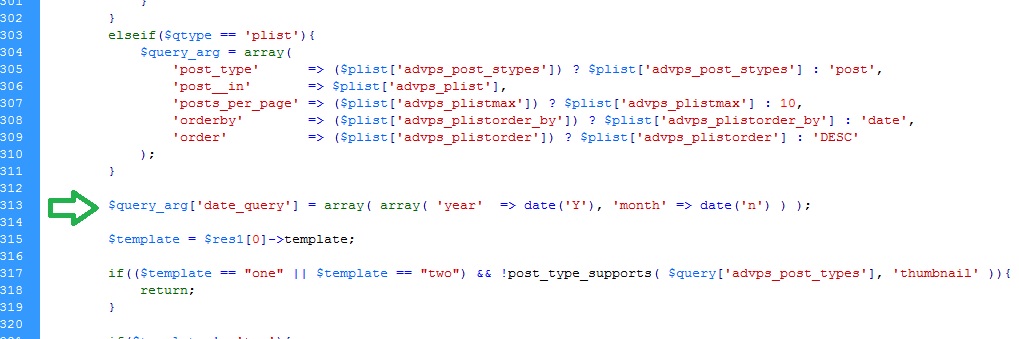
April 30, 2015 at 5:54 am #509KeymasterYou need to modify plugin file though its not recommended as your modification will be gone if you update the plugin later. If you need then try following solution.
Open ‘advanced-post-slider.php’ from plugin folder, go to line no around 313 and look for the line
$template = $res1[0]->template;Then paste the following line of code just above the previously mentioned line of code.
$query_arg['date_query'] = array( array( 'year' => date('Y'), 'month' => date('n') ) );After adding the line it should look like the following screenshot.
 April 28, 2015 at 8:59 am #505Keymaster
Just enable order by rand from admin panel (WP Engine dashboard). Hopefully it will work.
April 27, 2015 at 3:35 am #501KeymasterWe already have plan to add this at next version. You may wait few days or you can hard code the feature by editing plugin file.
April 25, 2015 at 5:11 pm #498KeymasterHi Smikey, we appreciate your patience. Actually we tested the feature in our environment and didn’t get any problem. We want to troubleshoot your problem and need some co-operation from you. First, let me know about your hosting server. Because some WordPress optimized hosting server by default disable the order by rand feature. In this case order by random will not work. For example if you use WP Engine hosting then you need to enable order by rand from admin panel. Otherwise it will not work in the query.
Second please provide a detail screenshot of your option set. We will try our best to figure out the problem. Thank you.
April 24, 2015 at 4:16 am #495KeymasterWe don’t have option for it right now. To keep things simple we didn’t add this so far. Though modifying plugins file is not recommended but if you need it then try the following solution
Open ‘advanced-post-slider.php’ from plugin folder, go to line no around 514
look for the following codeminSlides: <?php echo $caro_ticker['advps_caro_slds']?>,and replace the line with
minSlides: 1,then add the following line of code just below the previous line
moveSlides: 1,April 23, 2015 at 4:14 am #493KeymasterHello Smikey, If you have any caching plugin installed please deactivate and then check what happens. Also, if you have CDN or other server side caching, disable those and check. Let us know your feedback.
If this is a plugin issue we will try to resolve it ASAP. Thank you.
April 23, 2015 at 3:59 am #492KeymasterHello Kfiatek, I didn’t get your question properly. Would you able to explain it little more.
April 19, 2015 at 1:32 pm #488KeymasterHi Sam, first you can provide a screenshot of your used option set and the page URL where you implement the slider. We will try to figure out if you miss something.
Or if you want to try a fresh installation then you need to delete the database table named like ‘_advps_optionset’ and ‘_advps_thumbnail’.
April 15, 2015 at 4:53 am #485KeymasterHello Chris, sorry that we don’t have option to use the first image for now. We will consider to add this in later version but as we have some other task in hand it may take some time. For now, you may consider to modify ‘advanced-post-slider.php’ script to fit your need.
April 14, 2015 at 3:19 pm #483Keymasterplease, check this step by step starting tutorial https://www.wpcue.com/docs/simple-getting-started-advanced-post-slider/
April 13, 2015 at 4:36 am #481KeymasterAfter click prev/next you should wait until the animation is completed. In other words your next click will not work until the current click functionality is completed.
April 10, 2015 at 6:26 am #474KeymasterFirst, from ‘Container & Thumbnail’ section check which thumbnail size is used. Then go to ‘Thumbnail’ tab and change height. Check screenshot.

Also, you can use full size image by selecting ‘full’ from select thumbnail drop-down. (Container & Thumbnail section)
March 24, 2015 at 5:32 pm #468KeymasterNot sure here but sometime local dev environment may create problem depending on various issues including licensing. We will look for the issue.
-
AuthorPosts
